Showing posts with label license. Show all posts

SilkTest Question 45: How to fix no license for silktest_gui error?

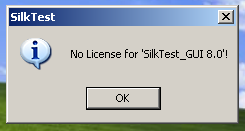
My coworker Senior QA Engineer started to ask the question about no license for silktest_gui 8.0 error to filter candidates without practical experience. The question sounds as the following: In preparation for major production release of your application you tried to start Silk Test 8.0 automation tool and suddenly getting the following windows pop up with error.

SilkTest license
Everything was working perfect in the quality assurance lab yesterday. Give at least two ideas how to fix it?

The most plausible reason would be that SilkTest license was not installed at all or in case it was installed you pointed your Silk Test to the wrong server address or wrong port number.

One more explanation is that everyone else in your QA team use floating licenses and your coworkers exhaust all SilkMeter's resources. You need to open the SilkMeter User Policy Administrator and verify that your licenses are still there and not checked out by anyone else.

By the way the error for SilkTest 2006 would be no 'license for silktest_gui 8.1' and you would not find anything about this error in SilkTest documentation.

Silktest Question 4 : Where can I buy any good basic or advance books on SilkTest?

The SilkTest tutorial and user guide will be shipped to your QA department as soon as your software company pays for SilkTest license to Segue (actually to Borland now). There are no SilkTest user guide or any other book on open market. I wish there was a book out something like "Teach Yourself Silk Test in 24 Hours", but no one has written one yet.

Related posts

  1. Top recommended HP QTP books
  2. Best Quality Assurance and Software Testing books review

Silktest Question 3 : Is SilkTest Extension Kit part of SilkTest?

Some features and tools are available only when they are purchased
separately and are licensed to you:

  • Extension Kit: if you purchased the Extension Kit, you must supply the password in order to install it during the SilkTest installation. Contact SilkTest Customer Service if you do not know your password


  • SilkTest Agent only: if you have purchased a license for the SilkTest Agent but not SilkTest, then only the Agent, sample applications, and the SilkTest Bitmap Tool are accessible after you install SilkTest.


UPDATES: Extension Kit is included at no extra cost starting with SilkTest 2006. If your maintenance contract is up to date, ask Borland about upgrade to SilkTest 2006R2. For older versions of tool, the extension kit was an add-on, which needed to be purchased separately. As soon as the Extension Kit is installed QA Engineer can get more information from Start -> Programs > Borland > SilkTest 2006 > Documentation -> Extension Kit Documentation and also from the SilkTest online Help file (Help > Help Topics)

SilkTest interview questions for QA Testers