Showing posts with label error. Show all posts

SilkTest Question 45: How to fix no license for silktest_gui error?

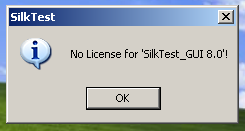
My coworker Senior QA Engineer started to ask the question about no license for silktest_gui 8.0 error to filter candidates without practical experience. The question sounds as the following: In preparation for major production release of your application you tried to start Silk Test 8.0 automation tool and suddenly getting the following windows pop up with error.

SilkTest license
Everything was working perfect in the quality assurance lab yesterday. Give at least two ideas how to fix it?

The most plausible reason would be that SilkTest license was not installed at all or in case it was installed you pointed your Silk Test to the wrong server address or wrong port number.

One more explanation is that everyone else in your QA team use floating licenses and your coworkers exhaust all SilkMeter's resources. You need to open the SilkMeter User Policy Administrator and verify that your licenses are still there and not checked out by anyone else.

By the way the error for SilkTest 2006 would be no 'license for silktest_gui 8.1' and you would not find anything about this error in SilkTest documentation.

SilkTest Question 40: Did you have any problem with FireFox and SilkTest 8.0?

This interview question is good to verify if candidate for automation QA Engineer position really worked with automation testing tool mention above. Not long ago Borland (BORL) has acknowledged the following defect in the SilkTest 8.0: the FireFox browser may suddenly crash during test script execution with the following mournful message "error loading C:\Program Files\Segue\SilkTest\nshlprfox.dll". It means if you examined web applications with 8.0 version of automated testing tool you definitely experienced capture issue with Firefox browser.

SilkTest Question 38: How to read value from read only text field?

Imagine that the text field has read only status or disabled. The Silk Test returns the unexpected error message "*** Error: Window '[HtmlTextField]Estimated:' is not enabled". Is it possible to obtain text field value?

As usual Lead QA engineer in automation can get value with Agent.SetOption features of SilkTest. The code to retrieve value of 'VMware' text field located on 'WinRunner' page of application under test posted below:

Agent.SetOption (OPT_VERIFY_ENABLED, FALSE)
Winrunner.VMware.GetText()
Agent.SetOption (OPT_VERIFY_ENABLED, TRUE)

SilkTest Question 37: How to fix "Mouse Coordinate (x,y) is off the screen" error?

During testing of web based application QA Engineer gets the following error "Mouse Coordinate (x,y) is off the screen" when the GUI object goes out of the screen. The issue appears when Silk Test tries to click the GUI objects which are out of screen area.

Provide the following 4test code above the code from where the mouse error occurs
  • Agent.SetOption (OPT_VERIFY_EXPOSED, FALSE)
Provide the following 4test code below the code from where the mouse error occurs
  • Agent.SetOption (OPT_VERIFY_EXPOSED, TRUE)

SilkTest Question 26: How to repair *** Error: Application not ready error?

During automated regression testing of web based application QA Engineer presses one of the browser controls and gets the error described below:
*** Error: Application is not ready Occured in WaitForReady

The QA engineer could mumble only that the error above is not consistent, it happens sometimes on one of the computer on QA lab, but last month the same 4Test script works perfect on all computers during testing of previous release of the same application.


It looks like your web based application takes to long to respond and SilkTest times out. In this case the usual solution is to boost the timeout values. The test developer can set timeout values for individual script or set globally

The first value to check is 4Test agent OPT_APPREADY_TIMEOUT option, the number of seconds that agent waits for an application to become ready.

The second value to check nInvokeTimeout, an integer that specifies the number of seconds that SilkTest waits to the main window of application to appear.

SilkTest Question 25: How to fix the explorer6_Dom[1] error?

We have a few test scripts written by outsourced QA team in 4test language for regression testing of our web based application. During test script execution the error message ***Error: Window '[MainWin]$explorer6_Dom[1]' was not found appears. The problem is that the error message above is not shown every time when I run script, sometimes the code runs just fine, but it may happen that if I execute testing again the DOM error message appears. Not a single engineer in our QA team is able to find answer in SilkTest documentation. We asked for help from outsourced testing team, but they do not have any clue at all.

One of the solutions to fix *** Error: Window '[MainWin]$explorer6_DOM[1]' was not found is to verify that "Enable Third Party Browser Extensions" option of Internet Explorer is checked. You can find it under Tools/Internet Options/Advanced
Do not forget to reboot your computer after enabling this options.

SilkTest Question 21: How to fix bitmap failed to stabilize error?

Software Quality Assurance Manager suddenly asked me to create straightforward test case for bitmap verification. During test case recording I selected option to verify entire window, but the eerie error "*** Error: Bitmap failed to stabilize" appeared during test case execution. The whole QA team is not able to find solution related to this issue in SilkTest documentation and one of us have seen already prepared pink slips for the whole department in manager's office.

Described bitmap issue occurs if the verified windows in not stable i.e. there is something changing on the screen frequently. The automation testing tool captures the stable copy of the bitmap and would raise E_BITMAP_NOT_STABLE exception if didn't get tested window in the specified time.

Your QA engineers can use the different approaches to get stable bitmap.

Set the following options to 0 in code
Agent.SetOption (OPT_BITMAP_MATCH_COUNT, 0)
Agent.SetOption (OPT_BITMAP_MATCH_TIMEOUT, 0)
Agent.SetOption (OPT_BITMAP_MATCH_INTERVAL, 0)

or

if your manager don't want you to mess with 4test code park your mouse pointer outside the verified window during test plan execution.

or

go to Options -> Agent -> Bitmap and change appropriate values in tab.

Silktest Question 8 : If I get an exception during executing DB_Connect, how do I know exactly what kind of exception it is?

The easiest way to handle exception is to wrap the DB_Connect call in a do..except, for example :

[-] do
[ ] Print ("MSSQL : dsn={sDsn};UID={SQL_User};PWD={SQL_Pwd}")
[ ] hdbc = DB_Connect ("dsn={sDsn};UID={SQL_User};PWD={ SQL _Pwd}")
[-] except
[-] ResOpenList ("Unable to connect to the DSN '{sDsn}' for the reasons below")
[ ] ExceptLog ()
[ ] ResCloseList()

Keep it generic. There could be huge number of reasons why the connection might fail, so checking for particular failure modes isn't appropriate here.

ExceptLog() will return the ODBC error number and text, QA engineer or Test Developer could parse the error message and programmatically respond depending on the error. Be aware though that the errors will be RDBMS specific.

Silktest Question 1 : SilkTest does not set DefaultBaseState for Internet Explorer

The error message from the results file shows:
[ ] *** DefaultBaseState is invoking Browser
[ ] *** Error: Unable to start Internet Explorer 6 DOM
[ ] Occurred in AppError
[ ] Called from Explorer.Invoke at extend\explorer.inc(470)
[ ] Called from Browser.Invoke at browser.inc(361)
[ ] Called from DefaultBaseState at defaults.inc(126)
[ ] Called from main at $ScriptMain(2)


First check to ensure that all of the extensions have been enabled properly within SilkTest. If this is fine, then ensure that there are not two versions of SilkTest installed on the machine.

If there are not two versions of SilkTest on the machine then there is the possibility that the machine was not restarted when uninstalling the older version of SilkTest prior to installing the new version.

In this case perform the following:

Uninstall SilkTest,
Restart the machine,
Reinstall SilkTest,
Restart the machine.

SilkTest interview questions for QA Testers